
Every Oracle Cloud Infrastructure (OCI) account, free or paid, comes with a set of services that never cost anything. Oracle calls them Oracle Cloud Always Free. Together with the Free Trial, they make up the Oracle free tier, which many people call the OCI free tier. The Always Free services are enough to run a small application, a test database or a proof of concept for as long as the account exists. They also come with hard caps, a home-region rule and an idle policy, and those are what turn “free” into a bill or into lost work.
This guide sets out what the Oracle Cloud Free Tier gives you in 2026, where the limits sit, and what to check before you build anything on it that you want to keep.
In short
- Always Free resources are free in your tenancy’s home region, for the life of the account, on every OCI account: Free Trial, Always Free-only and paid (Oracle’s Always Free Resources page, checked 1 November 2026).
- Compute: two AMD Micro VMs, plus Arm (Ampere A1) capacity of 2 OCPUs and 12 GB of memory in total, measured as the first 1,500 OCPU hours and 9,000 GB hours each month.
- Also free: 200 GB of block storage with five backups, two Autonomous AI Databases of 1 OCPU and 20 GB each, and 10 TB of outbound data a month.
- The Free Trial is separate: US$300 of credit for up to 30 days (Oracle’s Free Tier FAQ, checked 1 November 2026). When it ends, paid resources are reclaimed and Always Free ones stay.
Oracle Cloud Always Free, in Oracle’s words
“All Oracle Cloud Infrastructure accounts (whether free or paid) have a set of resources that are free of charge in the home region of the tenancy, for the life of the account.”
Four answers follow from that sentence.
| Question | Answer | Why it matters |
|---|---|---|
| Who gets it? | Every OCI tenancy | Free Trial, Always Free-only and paid accounts all receive the same bundle. |
| Where? | Your home region only | The region chosen when the tenancy was created. Resources created anywhere else are billed. |
| For how long? | The life of the account | Unlike Free Trial credit, the allowance does not expire. |
| How do I spot it? | A label in the Console | Eligible resources show “Always Free-eligible” when you create them. |
Always Free is not the Free Trial
People often mix up three account states. Always Free is the layer underneath all of them; what changes is what sits on top.
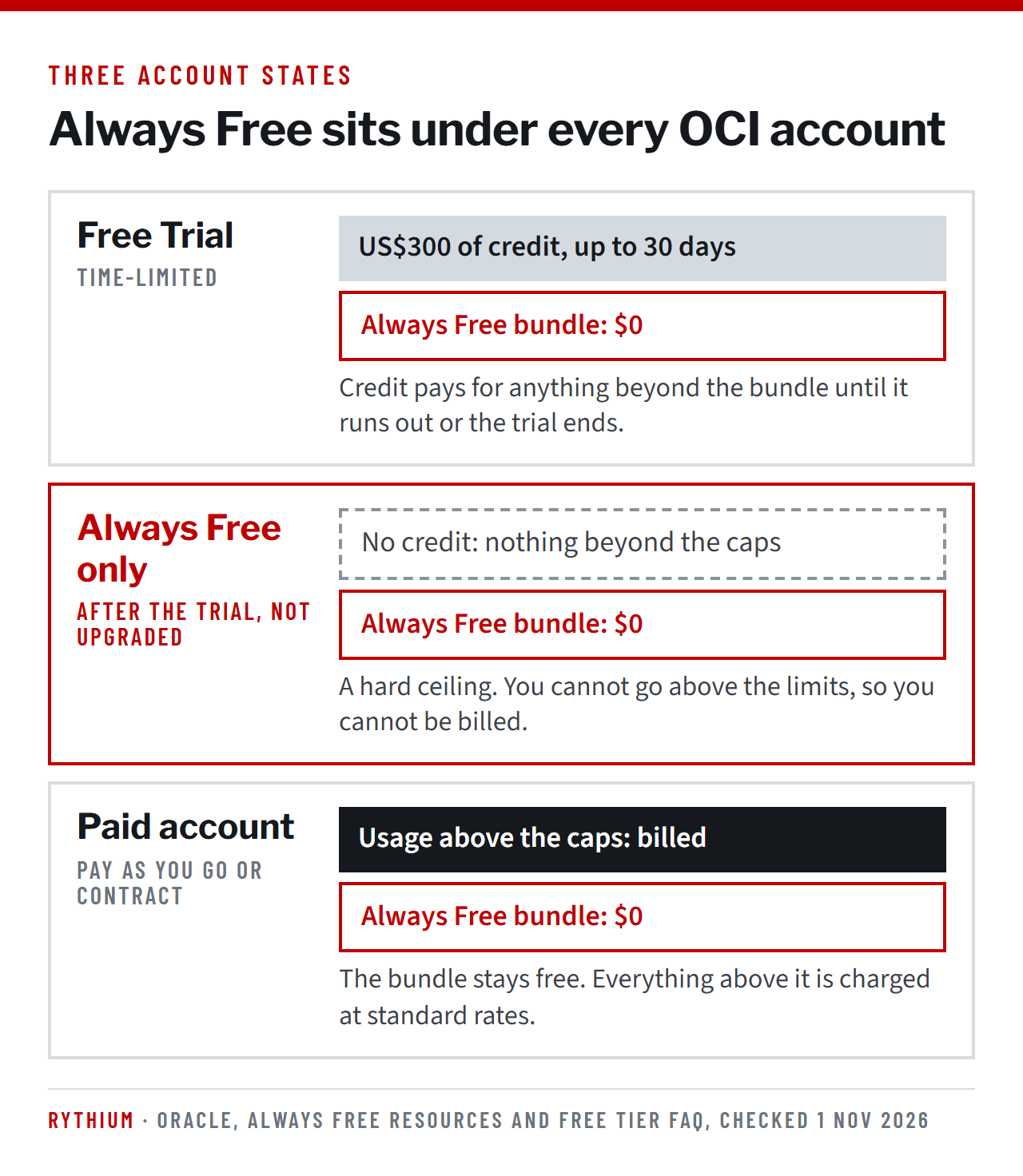
| Free Trial | Always Free only | Paid account | |
|---|---|---|---|
| What it is | US$300 of credit for up to 30 days | A permanent, capped allowance | Pay As You Go or a contract |
| Does it expire? | Yes: the credit and the trial period | No | No |
| Services | Almost any OCI service | Always Free-eligible only | The full catalog |
| Above the limits | Paid from the trial credit | Not possible | Billed at standard rates |
| Always Free bundle | Included, $0 | Included, $0 | Included, still $0 |
What the Oracle Cloud Free Tier includes in 2026
These figures are from Oracle’s Always Free Resources page as of 1 November 2026. Oracle changes the limits from time to time, so check the Console for your own tenancy’s values.
Compute
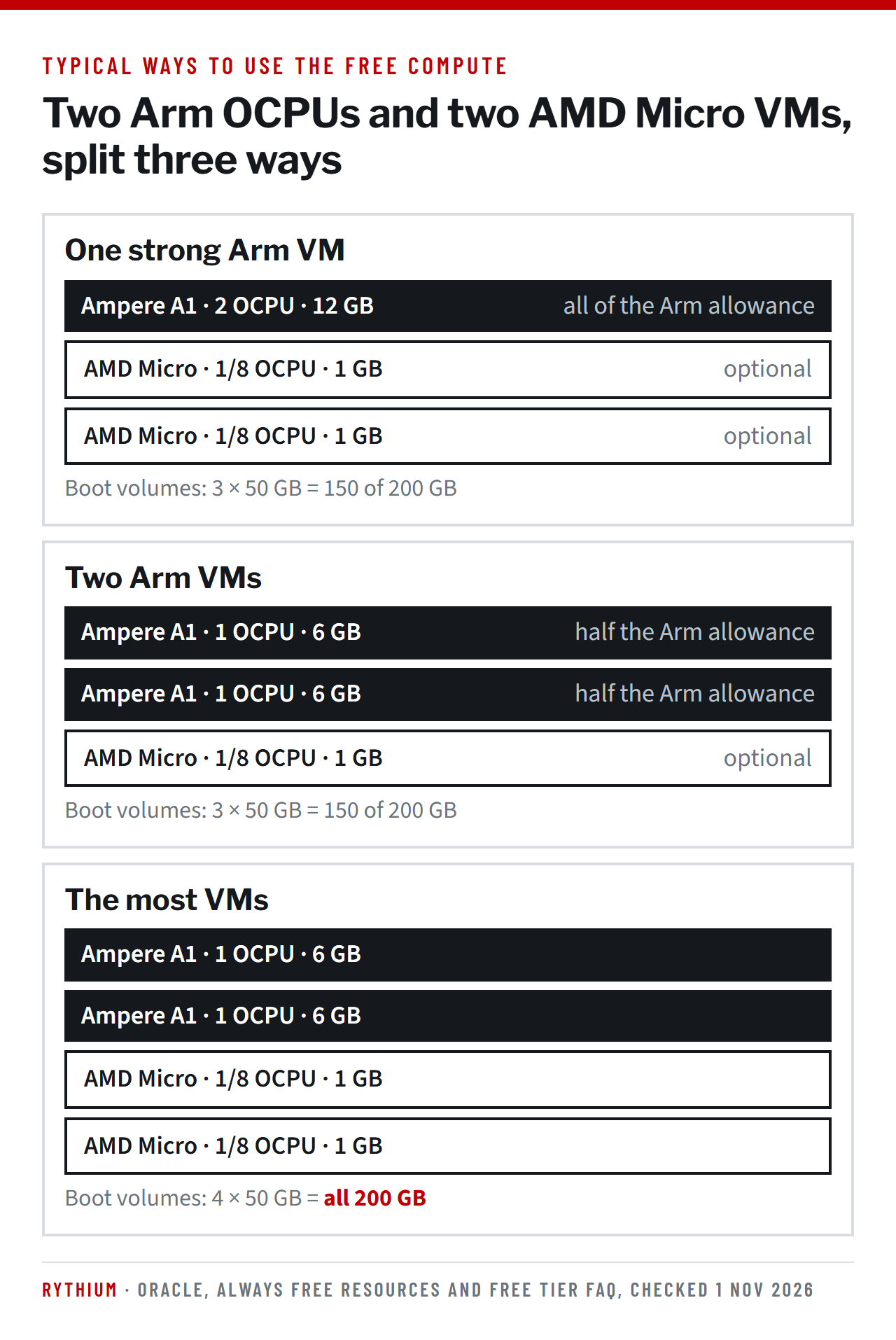
There are two kinds of free virtual machine, counted separately, so you can use both at once. Both must be created in your home region.
| AMD Micro | Ampere A1 (Arm) | |
|---|---|---|
| Shape | VM.Standard.E2.1.Micro | VM.Standard.A1.Flex |
| Processor | 1/8 OCPU, able to use more when available | 2 OCPUs in total, split as you like |
| Memory | 1 GB per VM | 12 GB in total, split as you like |
| Number of VMs | Up to 2 | 1 VM with 2 OCPUs, or 2 VMs with 1 OCPU each |
| How it is measured | Per instance | First 1,500 OCPU hours and 9,000 GB hours a month |
| Availability domain | One availability domain only | Any, except South Korea North (Chuncheon) |
Storage
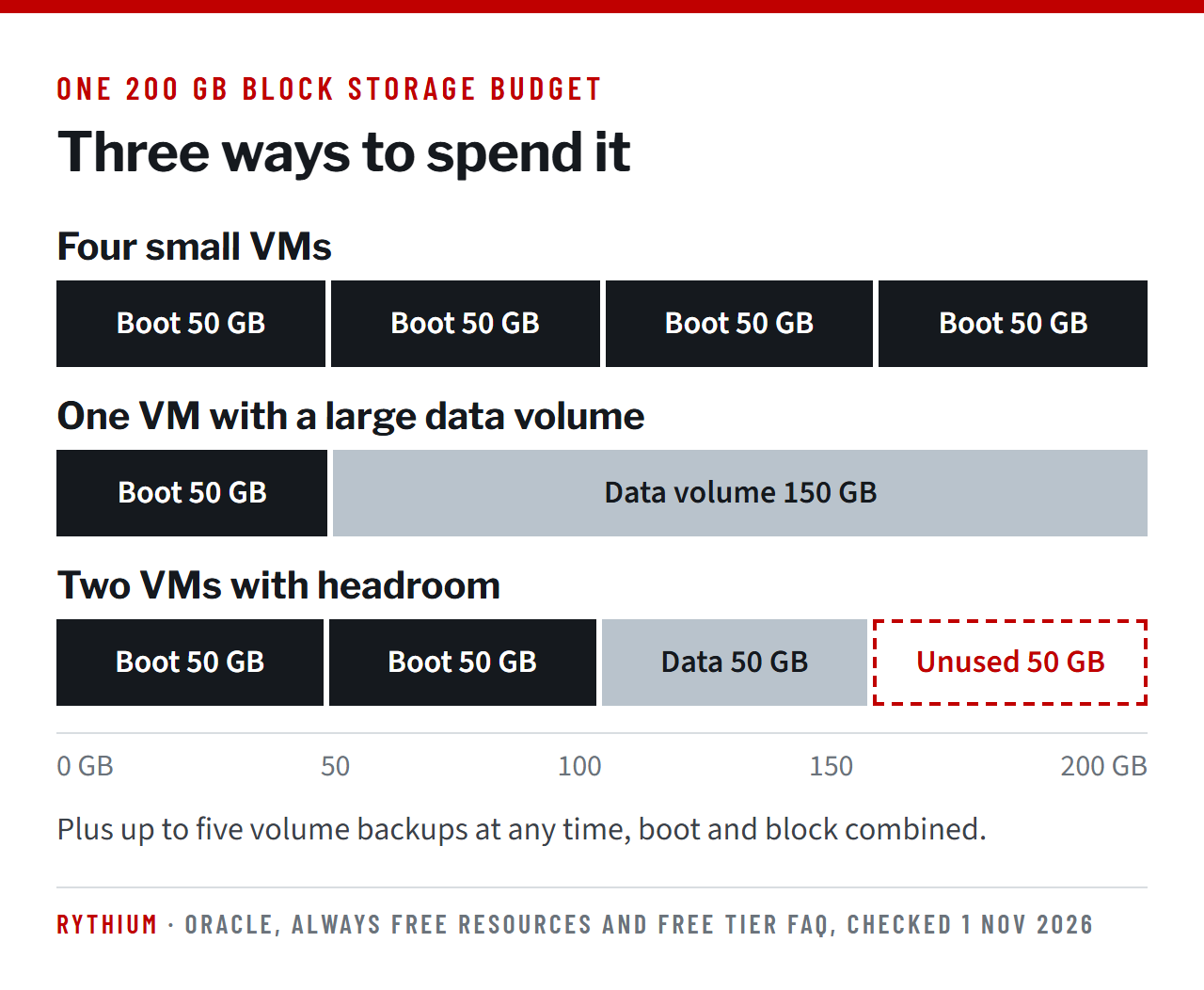
Block storage is the limit most people reach first. The 200 GB is shared by every boot volume and every data volume, and each VM’s boot volume takes 50 GB by default. In practice, storage decides how many VMs you can run more often than CPU does.
| Service | Always Free allowance | Notes |
|---|---|---|
| Block Volume | 200 GB in total, plus 5 volume backups | Boot and block volumes combined. A sixth backup fails until one is deleted. |
| Object Storage, Always Free-only account | 20 GB across the Standard, Infrequent Access and Archive tiers | Plus 50,000 API requests a month. |
| Object Storage, paid or trial account | 10 GB in each of the three tiers | Plus 50,000 API requests a month. Usage above this is billed. |
| Vault | All software-protected keys, 20 HSM key versions, 150 secrets | Private vaults are not included. |
| Certificates | 5 certificate authorities and 150 certificates |
Databases
Three database services are included, and all of them are fixed in size while they stay free.
| Database | How many | Allowance | Limits |
|---|---|---|---|
| Autonomous AI Database | 2 | 1 OCPU, 20 GB of storage and up to 20 sessions each, for transaction processing, JSON, APEX or Lakehouse workloads | Cannot scale. Not offered in every home region. |
| NoSQL Database | 1 | 133 million reads and 133 million writes a month, 3 tables of 25 GB each | |
| MySQL HeatWave | 1 | A standalone DB system with a single-node HeatWave cluster, 50 GB of data and 50 GB of backup | Home region only. |
An Always Free Autonomous AI Database can be upgraded to a paid instance if you need more CPU or storage. From that point on, it is billed.
Networking and other services
| Service | Always Free allowance |
|---|---|
| Outbound data transfer | 10 TB a month |
| Flexible Load Balancer | 1, at 10 Mbps (tenancies created on or after 15 December 2020) |
| Network Load Balancer | 1 |
| Virtual Cloud Networks | Up to 2 for Always Free-only tenancies |
| Site-to-Site VPN | Up to 50 IPSec connections |
| Monitoring | 500 million ingestion and 1 billion retrieval data points |
| Notifications | 1 million HTTPS and 1,000 email notifications a month |
| Email Delivery | 3,000 emails a month |
| Resource Manager (Terraform) | 100 stacks, 100 private templates, 2 concurrent jobs |
Where free stops
Always Free carries no bill only while you stay inside its rules. These are the assumptions we hear most often, against what Oracle’s rules say.
| Assumption | What Oracle’s rules say |
|---|---|
| “It is free in any region” | Only in your home region. A volume created in another region is billed at regular rates. |
| “Free means unlimited” | Every service has a hard cap. On a paid account, anything above it is billed automatically. |
| “I can use any shape or image” | Only Always Free-eligible shapes and images. Anything else needs a paid account or trial credit. |
| “Once created, it is mine” | Oracle may reclaim Always Free compute instances it considers idle. |
| “My data survives the trial” | If Object Storage holds more than 20 GB when the trial ends, all of the objects are deleted, not just the excess. |
The idle-instance rule
Oracle may reclaim an Always Free compute instance if, over a 7-day period, all of these are true:
- CPU utilization at the 95th percentile is below 20%;
- network utilization is below 20%;
- memory utilization is below 20% (Ampere A1 shapes only).
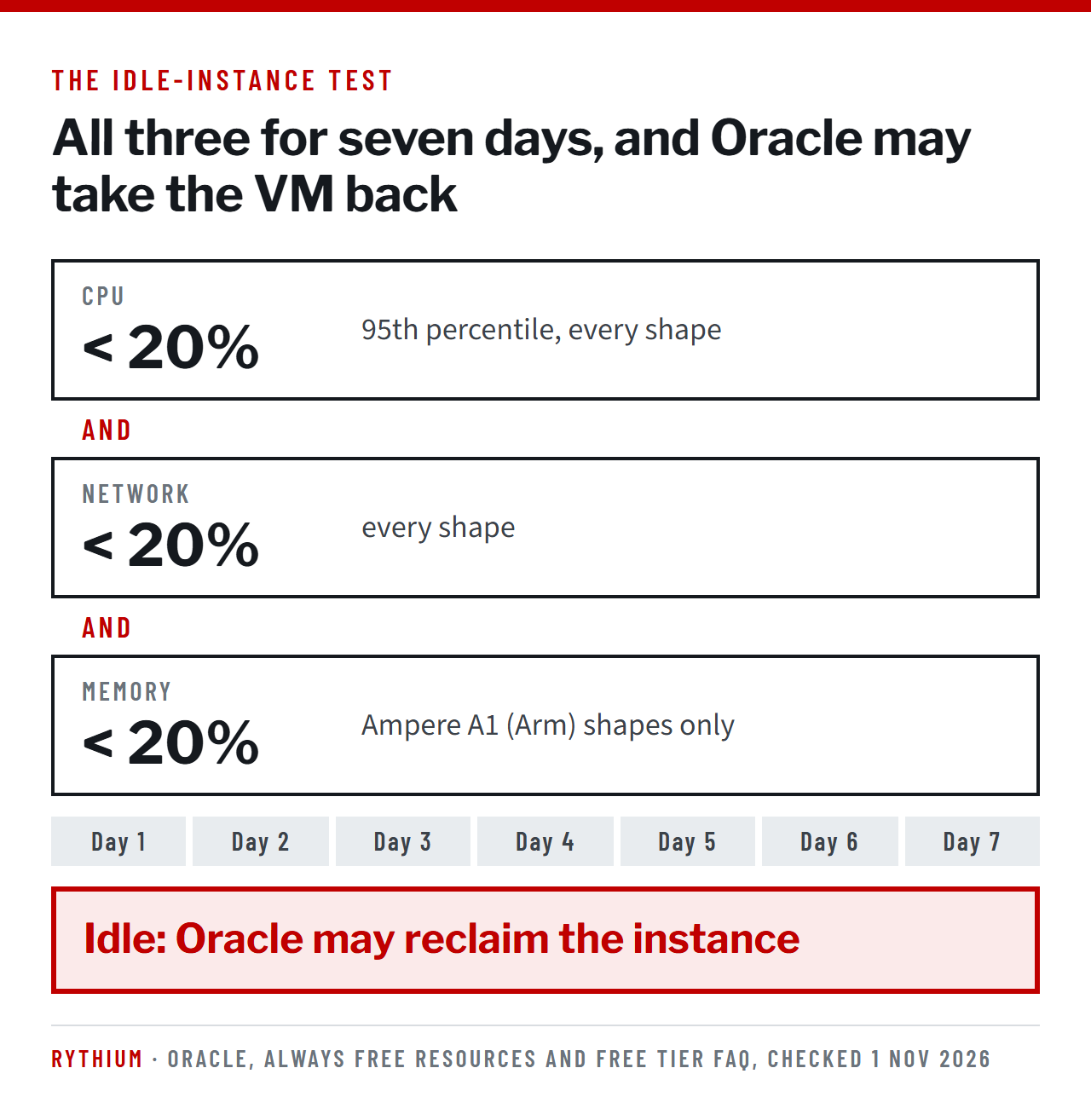
A VM that is set up and then left parked is exactly what this rule targets. Separately, Oracle’s FAQ says accounts left idle for 30 days or more may be treated as abandoned and suspended or terminated. Keep backups of anything you would not want to lose, and remember that only five volume backups are free.
When the Free Trial ends
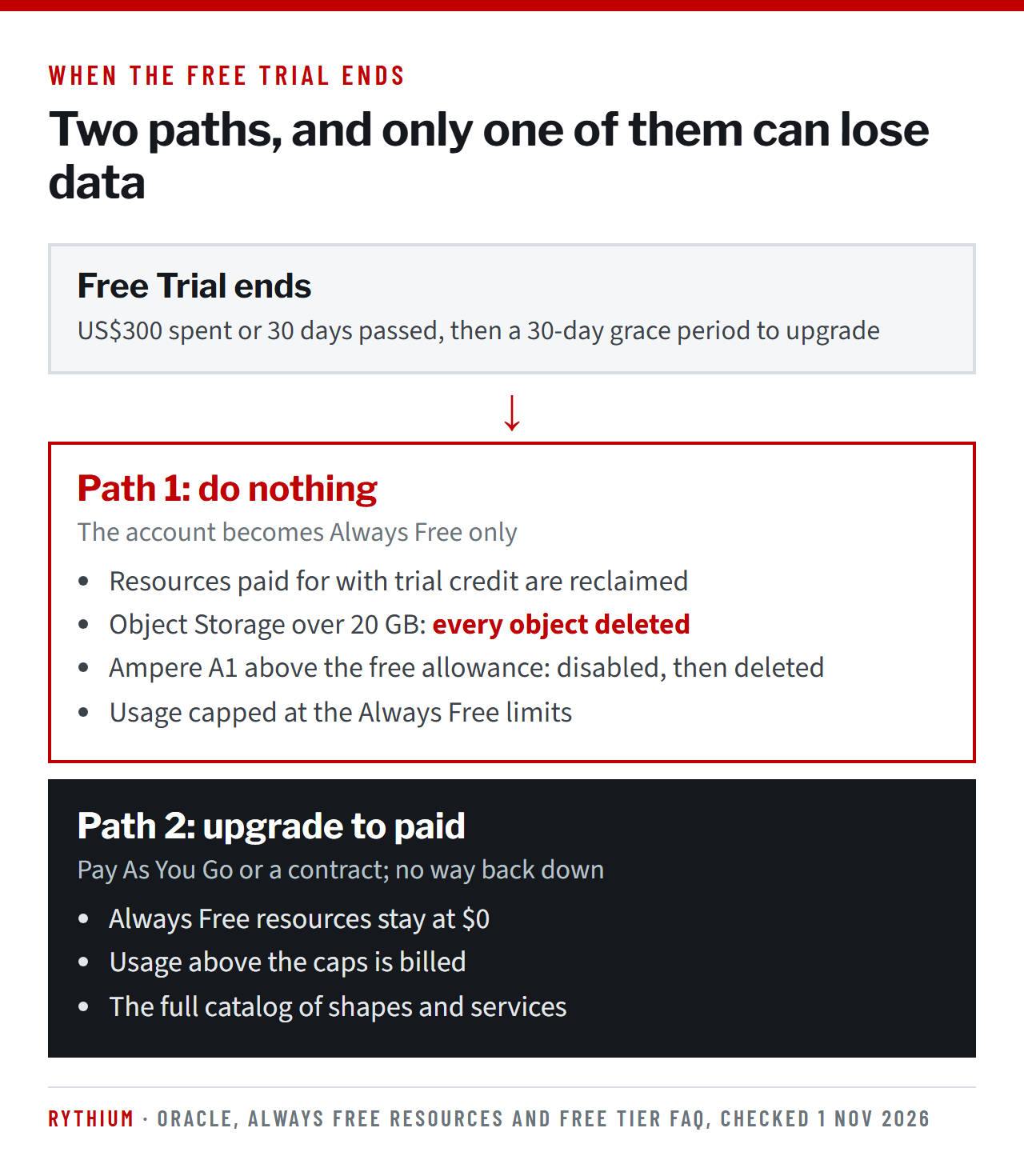
The trial ends when the US$300 is spent or 30 days have passed, whichever comes first. Oracle then gives a 30-day grace period to upgrade. If you do not upgrade:
- resources paid for with trial credit are reclaimed, and they cannot be restored;
- Always Free resources stay, and you can keep creating new ones within the limits;
- if you have more Ampere A1 instances than an Always Free tenancy allows, all of them are disabled and then deleted after 30 days;
- if Object Storage holds more than 20 GB across all tiers, every object is deleted.
After you upgrade to a paid account
Always Free resources stay free after an upgrade, and there is no way to downgrade again. Two things change how the bill behaves:
- Usage above the caps is billed at standard rates, so a test environment can grow into a running cost without anyone deciding it should.
- When an Always Free volume is deleted, Block Volume automatically converts an existing paid volume to Always Free. That saves money but makes the bill harder to predict.
Oracle recommends compartment quotas to control consumption. Set them before you upgrade, not after.
What Always Free does not cover
Oracle software you install yourself
The allowance covers the infrastructure, the Always Free Autonomous AI Database and the Linux images marked Always Free-eligible, which Oracle says carry no licensing fees. Oracle software you install on a free VM yourself, such as Oracle Database or WebLogic Server, is not part of it: it needs its own license under Oracle’s rules for OCI Compute. Our Oracle BYOL and OCI optimization page explains how those licenses are counted.
Support and service levels
The Free Tier comes with no service level agreement. Accounts that use only Always Free resources are not eligible for Oracle Support; the community forums are the help on offer.
Oracle Support Rewards
Free Tier and Free Trial usage does not earn Support Rewards. Rewards start only with paid consumption under a Universal Credits order.
Six guardrails to keep it free
- Know your home region. Create every Always Free resource there and nowhere else.
- Look for the label. Choose only shapes, images and services marked Always Free-eligible.
- Check the meter. In the Console, go to Governance & Administration, then Tenancy Management, then Limits, Quotas and Usage.
- Set quotas before upgrading. Compartment quotas stop usage spilling into paid services.
- Trim storage before the trial ends. Get Object Storage under 20 GB across all tiers, or upgrade.
- Use it, and back it up. Idle VMs can be reclaimed, and only five volume backups are free.
Questions we are asked about the Oracle Cloud Free Tier
Is the Oracle Cloud Free Tier really free forever?
The Always Free part is, for the life of the account, as long as you stay in your home region, under the limits, and keep the resources in use. The US$300 Free Trial credit lasts up to 30 days.
Is the OCI free tier the same as Oracle Cloud Always Free?
No. The OCI free tier has two parts: the Free Trial, which gives US$300 of credit for up to 30 days, and Oracle Cloud Always Free, a permanent, capped allowance that every account keeps, free or paid. When the trial ends, only the Always Free part stays free.
What happens to my resources when the Free Trial ends?
Always Free resources stay. Resources paid for with trial credit are reclaimed unless you upgrade within the 30-day grace period, Ampere A1 instances above the Always Free allowance are disabled and then deleted, and Object Storage over 20 GB loses every object.
Can I run Oracle Database on the Always Free tier?
Yes, as an Always Free Autonomous AI Database: two instances of 1 OCPU and 20 GB each, in regions that offer them. Installing Oracle Database yourself on a free VM is different, because the software then needs its own license.
Why do I get an “out of host capacity” error?
Your home region has temporarily run out of Always Free shapes. Try another availability domain or try again later; Oracle says it can take several days for capacity to return.
Do I need a credit card to sign up?
Yes. Oracle accepts credit cards and debit cards that work like credit cards, but not prepaid, virtual or single-use cards. One Free Tier account is allowed per person.
Always Free is generous for small workloads and proofs of concept. Moving production workloads to OCI is a different decision, where licenses, the Universal Credits commitment and Support Rewards set the cost. If that move is on your plan, read our BYOL and OCI optimization page or talk to us.
Sources: Oracle Cloud Infrastructure documentation, “Always Free Resources”; Oracle Cloud Free Tier FAQ; Oracle Support Rewards FAQ. All checked on 1 November 2026. Limits change, so check the Console for your tenancy’s current values.
Sheshagiri Anegondi
Managing Partner of Rythium Technologies. Seventeen years at Oracle, from 1998 to 2015, in leadership roles including Vice President Sales, after Compaq and Digital Equipment Corporation.
Author of “Licensing Oracle: The Reference Manual for Managing Oracle License Compliance & Procuring Oracle Software, Hardware, Cloud & Services” (2021, ISBN 10: 1639046887).
See more of our analysis in Google: add Rythium as a preferred source