
The short answer: You buy Oracle licences on a metric, usually per processor or per named user, and then pay 22% of the price every year for support. How many licences you need depends on where the software is installed or running, which edition and options you use, and how your servers are set up. The price list is the easy part; the counting is where companies overpay or get caught short in an audit.
This guide explains how Oracle counts, in plain terms, with the numbers worked out. It quotes Oracle’s own documents where it matters, because Oracle’s wording decides most disputes.
In short
- Two main metrics. Processor licences count the cores in your servers. Named User Plus licences count the people and devices that can use the software, with a minimum per processor.
- The core factor. On Intel and AMD servers, two cores make one processor licence. Two 16-core chips need 16 licences.
- The price. Database Enterprise Edition lists at $47,500 per processor. Support adds $10,450 a year. Options such as Partitioning are extra.
- Where it runs matters. On AWS, Azure and Google Cloud, the same cores need twice the licences. VMware clusters and standby servers are the other big surprises.
- Your contract decides. Oracle’s policies on virtualisation and the cloud are not part of most contracts, but audits start from them.
Five questions decide what you owe
Every Oracle licence position comes down to five questions. The rest of this guide takes them one at a time.
- What did you buy, and on which metric?
- Where is the software installed or running?
- Which edition, options and packs are in use?
- How many copies exist, including test and standby servers?
- Is support current on all of it?
1. What you buy: a licence, then support every year
Most Oracle software, including Database and WebLogic, is sold as a perpetual licence, which you pay for once and may use for as long as you like within the terms of your order. Almost everyone also buys support, which gives you patches, new versions and access to Oracle’s help desk. Support costs 22% of the price you paid, every year.
That second number adds up quickly: by year five you have paid more for support than for the licence. Oracle also sells term licences, cloud subscriptions and, for Java, a subscription priced per employee.
Your rights sit in two documents. The master agreement sets the general terms. Each ordering document lists what you bought: the product, the metric, the quantity and any limits, such as use with one application only. Keep both, because they are your side of every licence discussion.
2. How Oracle counts: processors and named users
Processor licences
Oracle’s price list defines it this way: “Processor: shall be defined as all processors where the Oracle programs are installed and/or running.” Note the words “installed and/or running”: a copy that is installed but sitting idle still counts.
To turn a server into a number of licences, Oracle multiplies the physical cores by a core factor for the chip, then rounds up. Intel Xeon and AMD EPYC have a factor of 0.5. IBM POWER has 1.0. Our guide to the Oracle core factor table lists the rest.
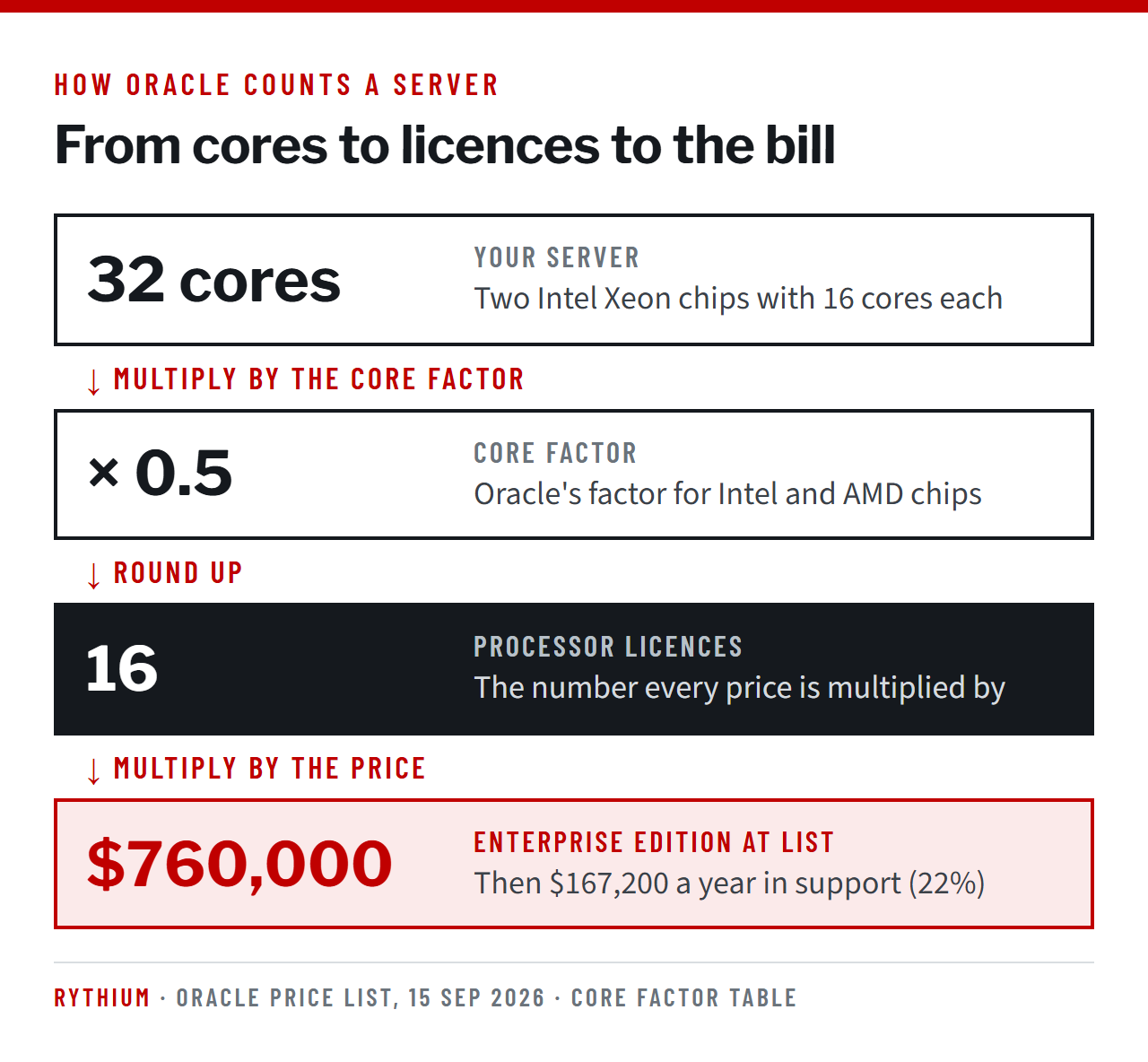
Products with “Standard Edition” in the name count differently. Each occupied socket is one processor, however many cores the chip has.
Named User Plus licences
Named User Plus counts who can use the software, not how many people use it at once. In Oracle’s words, it covers “an individual authorized by you to use the programs … regardless of whether the individual is actively using the programs at any given time.” Devices count too, if they can reach the software without a person.
Two rules catch people out. First, there is a minimum: 25 Named User Plus per processor for Enterprise Edition, and 10 per server for Standard Edition 2. Second, if users reach the database through an application or web server that pools connections, Oracle counts the users at the front end, not the few connections at the database.
Which metric is cheaper?
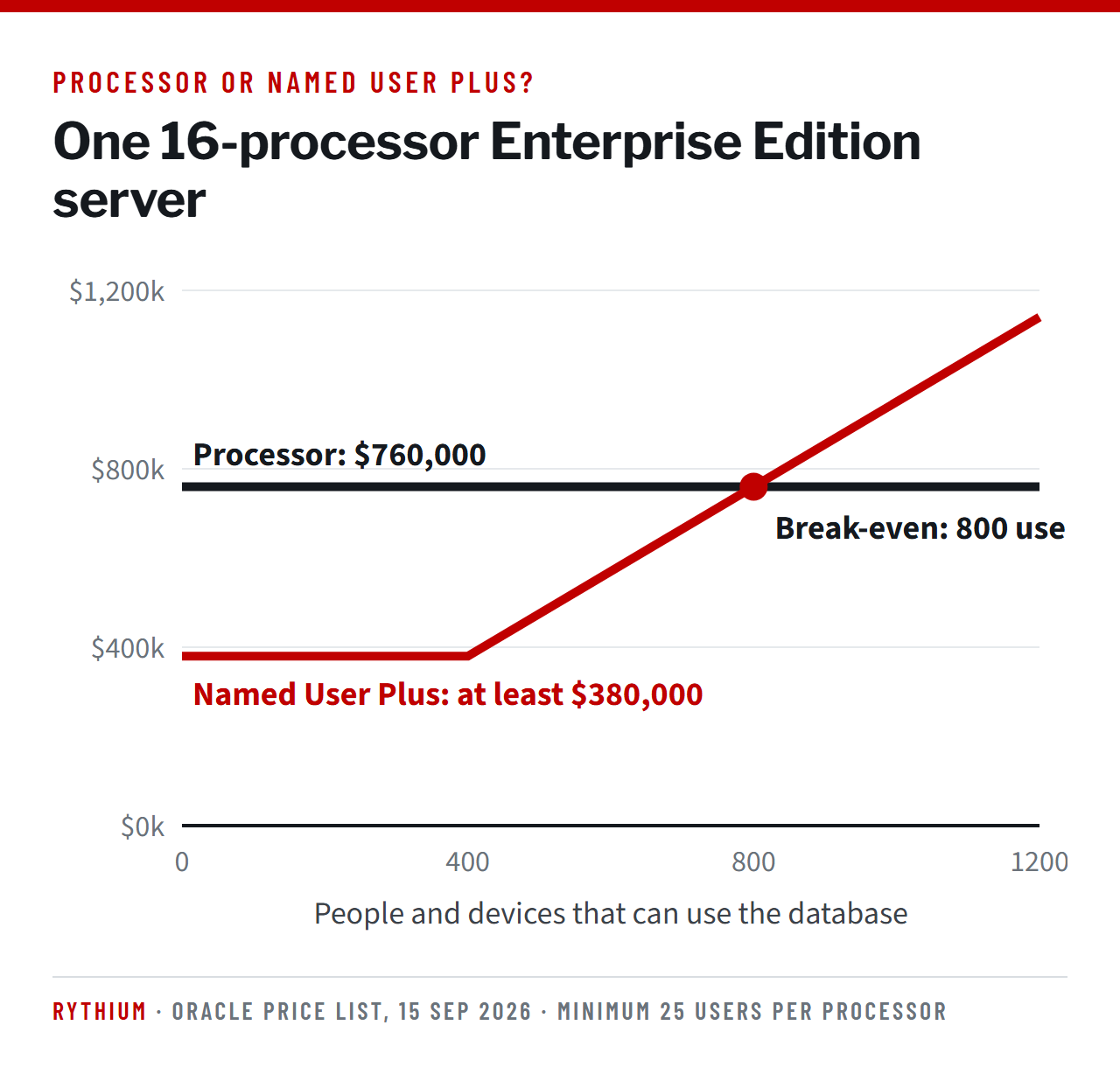
Named User Plus is cheaper when few people can use a system, and processor licences are cheaper when many can. For one 16-processor Enterprise Edition server, the minimum is 400 named users, which costs $380,000. Processor licences cost $760,000. The two meet at 800 users.
3. Editions, options and packs
Oracle Database comes in two main editions.
- Enterprise Edition costs $47,500 per processor at list. It can run on any size of server, and it can take paid options.
- Standard Edition 2 costs $17,500 per processor. It may only run on servers with up to two sockets, and each database can use at most 16 CPU threads.
Options and packs are where costs grow without anyone deciding to buy, because each one is licensed on the same number of processors as the database it runs on. Real Application Clusters costs $23,000 per processor. Partitioning, Active Data Guard and Advanced Compression cost $11,500 each. The Diagnostics Pack costs $7,500 and is switched on by default in Enterprise Edition, so running a standard AWR performance report uses it.
Our guide to what Oracle costs prices full server configurations.
4. Where the software runs changes the count
Virtual machines and VMware
Oracle publishes a Partitioning Policy that sorts virtualisation into two groups. With hard partitioning, such as IBM LPAR or Oracle Linux KVM with cores pinned, you license only the cores you assign. With soft partitioning, which includes VMware, Oracle asks for every core of every host the virtual machine could move to. In a large VMware cluster, that can mean hundreds of cores for one small database.
The policy itself says it is “for educational purposes only” and “may not be incorporated into any contract”. So it does not bind you, but an audit report starts from it, which is why the safest design keeps Oracle in its own small cluster. Our guide to licensing Oracle on VMware covers the details.
Containers
Under the same policy, once a container image with an Oracle program is pulled to a host, that host must be licensed for all its processors.
Public cloud
Oracle names three Authorized Cloud Environments: AWS, Microsoft Azure and Google Cloud. There, two vCPUs count as one processor licence, and the core factor does not apply. Because a vCPU is usually half of a physical core, the same hardware needs twice as many licences. On Oracle’s own cloud, one licence covers two OCPUs, and an OCPU is a full core. So Oracle Cloud counts the same way your data centre does.
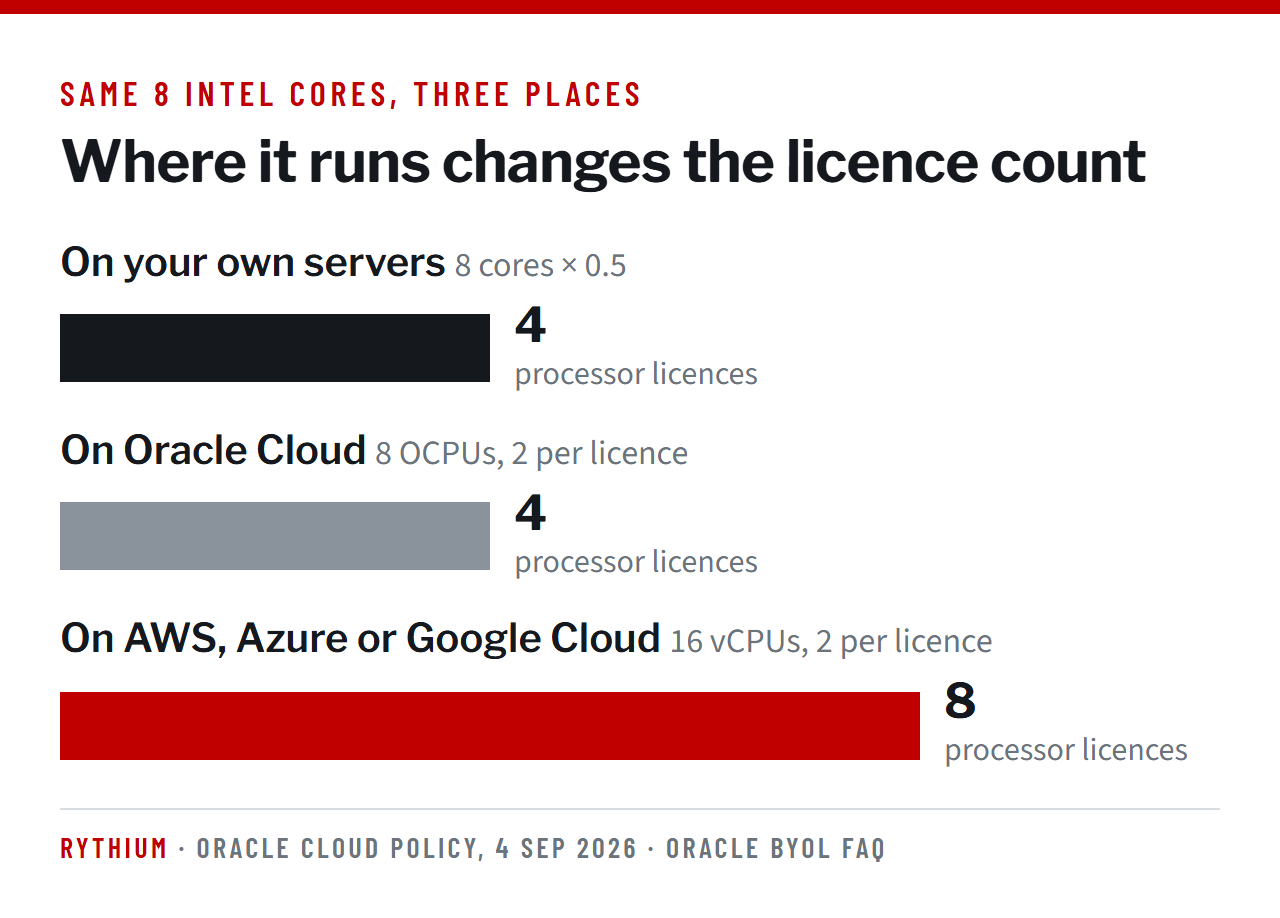
Our guide to licensing Oracle in the cloud covers each provider.
5. Copies: test, standby and disaster recovery
Every server where Oracle is installed or running needs licences, including test, staging and standby servers, and a Data Guard standby that nobody logs into still counts. There is one narrow exception: a spare node in a failover cluster may run for up to ten days a year without a licence. Our guide to Oracle disaster recovery licensing explains the rules.
6. Support: harder to cut than to buy
Support follows three rules that surprise most buyers.
- You cannot support part of a licence set. A product and its options are supported together, or not at all.
- If you end support on some licences in an order, Oracle reprices the support on the rest. The saving can disappear.
- If support lapses and you come back, Oracle charges a reinstatement fee of 150% of the last annual fee for the time you were away.
Unlimited License Agreements
An Unlimited License Agreement, or ULA, lets you deploy named products without limit for a fixed term, usually three to five years. At the end you either renew it or certify. Certifying means counting everything you have deployed and reporting it within 30 days of the end date. That count becomes your permanent licence quantity. Copies on AWS, Azure and Google Cloud cannot be counted. Our ULA certification work starts a year before the end date for this reason.
When Oracle checks: audits
Oracle’s standard agreement lets it audit your use on 45 days’ written notice. Its licensing team, Global Licensing and Advisory Services (formerly LMS), measures your estate, and its sales team then proposes a purchase to close any gap.
In Rythium’s audit work since 2016, we have not found one Oracle customer audited by Oracle with a fully compliant deployment. We have seen customers running just a couple of database instances face an alleged exposure of US$3 million. The size of the estate is not what decides the size of the claim.
Rythium audit defense practice
Our guide to the Oracle audit process explains each step, and our audit defense page explains how we handle them.
The mistakes we see most often
- Counting threads or vCPUs on your own servers. Oracle counts physical cores there.
- Licensing three VMware hosts when Oracle virtual machines can move across thirty.
- Running AWR reports or Enterprise Manager performance pages without the Diagnostics Pack.
- Leaving test, staging and standby servers out of the count.
- Sizing a cloud move with the on-premises numbers.
- Installing Oracle Java where a free OpenJDK build would do.
Questions people ask about Oracle licensing
How does Oracle licensing work?
You buy licences for each product on a metric, usually per processor or per named user, and normally pay 22% of the price each year for support. The number you need depends on the cores, virtualisation and cloud where the software is installed or running, plus the options in use.
How much is an Oracle licence?
Database Enterprise Edition lists at $47,500 per processor or $950 per named user. Standard Edition 2 lists at $17,500 per processor or $350 per named user. Support is 22% a year on top. Most large buyers negotiate a discount.
What counts as a named user?
Every person authorised to use the software, whether or not they use it today, plus any device that can reach it without a person. Users behind an application server are counted at the front end, not at the database.
Do test and development servers need Oracle licences?
Yes. Oracle counts every server where a program is installed or running, including test, staging and standby. Oracle’s free developer licence covers limited development and prototyping, not running copies of your business systems.
Do I need to license every VMware host?
Oracle’s Partitioning Policy asks for every host an Oracle virtual machine could run on. The policy is not part of most contracts, but audits start from it. Keeping Oracle in a small, dedicated cluster keeps the number down.
What is an Oracle ULA?
An Unlimited License Agreement lets you deploy named products without limit for a fixed term. At the end you renew it or certify, which turns your deployment count into permanent licences.
Can I stop paying Oracle support?
Yes, but it is all or nothing for each product and its options. Ending part of an order can raise the price of the rest, and coming back after a lapse costs a reinstatement fee.
Oracle licensing rewards the customers who know their numbers before Oracle asks. Book an hour with our Advisor on Call to check one question, or talk to us about a full review.
Sources: Oracle Technology Global Price List, 15 September 2026 (prices, metric definitions, minimums); Oracle Processor Core Factor Table; Oracle Partitioning Policy (as of 14 February 2022); Licensing Oracle Software in the Cloud Computing Environment (in effect 4 September 2026); Oracle BYOL FAQ; Licensing Data Recovery Environments (as of 15 December 2024); Oracle Software Technical Support Policies.

Sheshagiri Anegondi
Managing Partner of Rythium Technologies. Seventeen years at Oracle, from 1998 to 2015, in leadership roles including Vice President Sales, after Compaq and Digital Equipment Corporation.
Author of “Licensing Oracle: The Reference Manual for Managing Oracle License Compliance & Procuring Oracle Software, Hardware, Cloud & Services” (Notion Press, 2021) (ISBN 10: 1639046887).